See the wall
before it hits you.
Your Claude quota, right there in the menu bar.
One glance — and you know.
- One-time purchase
- 100% on-device
- Native macOS 12+
Same Claude plan.
Very different day.
- Tab-check claude.ai every 15 minutes, in vain.
- Blindsided by a rate limit mid-flow.
- Stare at 73% and wonder: safe, or about to crash?
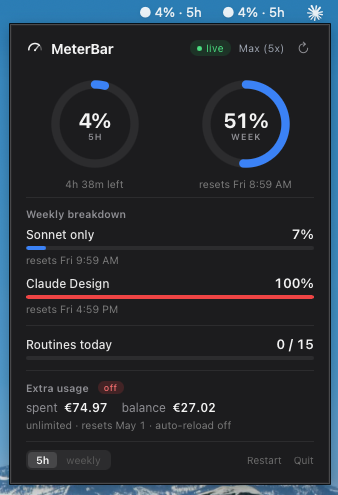
- A glance at the menu bar tells you everything.
- A nudge at 80% — wrap up on your terms.
- Blue, amber, red. Zero ambiguity.
You're paying for Claude
and flying blind.
-
✕You're deep in a problem. Claude just stops. No warning — just a rate limit and hours to wait.
-
✕Anthropic shows you 73%. Safe? Dangerous? You have no context and no idea whether to slow down.
-
✕You keep a claude.ai tab open, refreshing. Every check pulls you out of your work.
You've seen this before.
You'll never get caught
off guard again.
Four things it does. That's all it needs to do.
One glance — you know
Session and weekly quota, right there in your menu bar. The number changes color as the limit gets closer, so you pace yourself instead of getting ambushed.
A nudge before the wall
A gentle notification at 80%. Plenty of time to wrap up on your terms — not scramble after the fact.
Invisible until you need it
Tiny. Native. Always on. No Dock clutter, no spinning fan. A number in your menu bar — and that's it.
Your data stays on your Mac
No accounts. No tracking. Nothing leaves the machine. The only thing MeterBar talks to is your own Claude account.
Three minutes. Then you're done.
Download
Drag MeterBar into Applications. Paste your key. Ninety seconds, start to finish.
Sign in once
Connect your Claude account in a private window. The connection stays on your Mac — nowhere else.
Breathe
Your quota lives in your menu bar now. Nudges before the wall. You'll wonder how you ever worked without it.
“I got rate-limited in the middle of a refactor four times in one week. I'm a Max user — I shouldn't have to babysit a usage dashboard. So I built the tool I wanted: one glance, you know.”
Pay once. Own it forever.
Less than 10% of your monthly Claude bill.
- Live quota gauge in your menu bar
- Real-time claude.ai sync
- Alerts before you hit the wall
- All future updates included
Questions
You paid for Claude.
Use it without anxiety.
Know your quota. See the wall before it hits. Stay in your flow.
One purchase — lives quietly in your menu bar for good.
One-time purchase · Lives quietly in your menu bar